|
We work with soul and strive to make sure our mosaic software would be the best in the world!

|
(Size: 9.6 MB)
|

|
For several years the Artensoft company has been developing technologies and algorithms for creating spectacular photo mosaics of the highest quality.
Unlike other mosaic software implementations, in Artensoft Photo Mosaic Wizard these features and algorithms allow you to create some of the best photomosaic work in the world.
Initially, Artensoft positioned its product as the one that does just "correct," "genuine," ("true mosaic") photo mosaics. When creating a photo mosaic, no overlay, color correction, blur, etc, were used. An "genuine" photo mosaic was compiled from the mini-images through careful selection of location and orientation. For the most part, existing mosaic software for producing photo mosaics resort to fraud in the following techniques, tricks and shortcuts that lead to counterfeit ("fake mosaic"), low-quality photo mosaic:
- Overlay of the base image that is the basis of the photo mosaic, which causes the base image to be somewhat blurry, and imposes a certain degree of transparency.
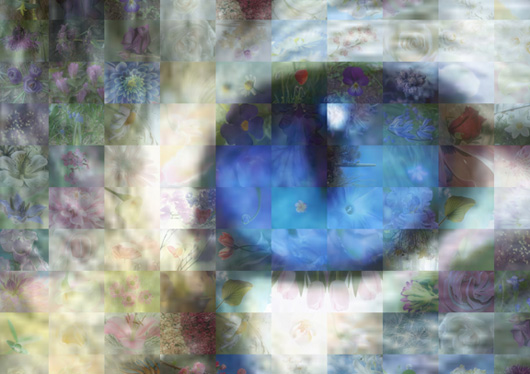
This picture was made by another mosaic software to produce a photo mosaic, but with the same original image and base mini-images
- Color correction of photomosaic elements
- The use of a grid of squares, rather than substitute the horizontal (landscape) or vertical (portrait) rectangular images
- The use of a simplified method of selection of elements in a grid, where one image is interpreted as one color in the original image
- The use of a large number of elements where one element is almost one pixel of the original image, with the result that the constituent elements obtained are very small and uninteresting for viewing. An example of such a photo mosaic (made with one of the online services to create a photo mosaic):
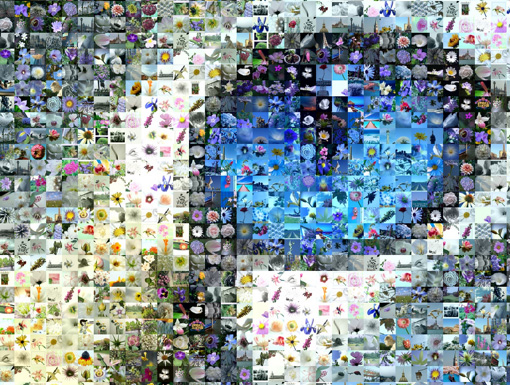
- Inaccurate selection of nearest element by color:
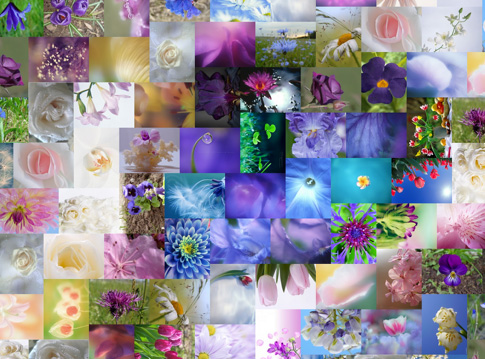
As seen in the figure, some elements are quite different from the original by color (e.g., in the center of the cat's eye, a green element is placed)
One of the major challenges in the development of the Artensoft Photo Mosaic Wizard mosaic software was the creation of this photomosaic using only "genuine" techniques. And already the first version of the mosaic software was able to make photomosaics of excellent quality, which visibly look better than those of other programs. Over time, we received many letters from users who still asked to add the ability to overlay the original on a finished photo mosaic, as well as to reduce the minimum number of images for constructing photo mosaics. More information about the blend modes can be found in a separate article.
Thus, the mosaic software from Artensoft is free from the above shortcomings. Try the program yourself and see that it does the job. We hope you enjoy working with it!
An example photo mosaic created in the Artensoft Photo Mosaic Wizard program without any of the tricks and shortcuts listed above:
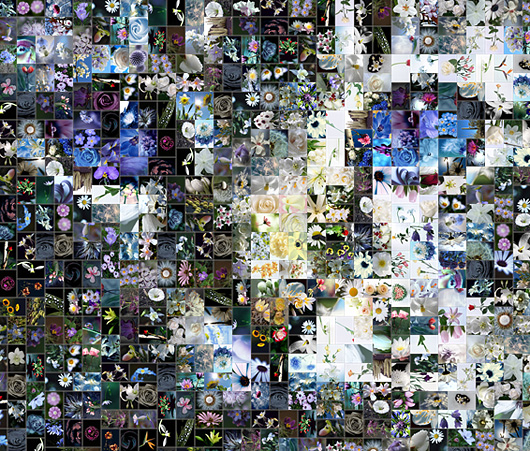
In this photo mosaic using a base of about 2000 images of flowers, the number of elements of the photomosaic is 500. Radius of duplicate exclusion = 5. No overlay.
|
|
(Size: 9.6 MB)
|
|
Artensoft Photo Mosaic Wizard is fully featured, usable, and affordable mosaic photo software, with a free evaluation version available for download.
Feel free to visit our gallery featuring dozens of cool photo mosaics.
Just click this link and enjoy the show.
|








 Minor bug fixes;