Albums
Home   Downloads   Purchase   Support   About Us          

 Home
 Downloads
 Purchase
 Support
 About Us

Photo Mosaic Wizard
 Download
 Purchase
 Screenshots
 Gallery
 Articles

Photo Collage Maker
 Download
 Purchase
 Screenshots
 Gallery

Tilt-Shift Generator
 Download
 Purchase
 Screenshots
 Gallery

Artensoft Photo Editor
 Download
 Help
 Purchase
 Screenshots

-Online Help

   Introduction
   Tutorial video
   Key features
   Requirements
   License
   What's new
User interface
   Working modes
   Adding new photos
   Active Folders
   Albums
   Keywords
   Filtering
   Editing
Registration
   How to register
   Limitations of unregistered version
Support
   Contacts
   The latest version of Artensoft Photo Editor

Albums

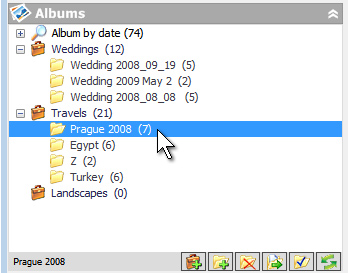
Thanks to the album hierarchy, you can group photos by topics no matter where they are actually located, for example, you can collect all landscapes of portraits in one place. One and the same photo can be present in different collections. You can create the storage hierarchy that will be convenient for you, for example:
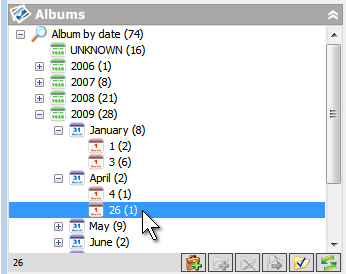
The album hierarchy also contains automatically updated "date album", where you can easily select photos by the year, month and date of shooting. The date of shooting is taken from the EXIF metadata.
! Note that photos are assigned to albums and keywords by dragging and dropping the selected thumbnail images from the list to the corresponding album.

We create best photo collage and photo mosaic software! Terms Of Use       Privacy Policy       EULA
ai collage maker   © 2026 Artensoft™. All rights reserved.