Photo editing
Home   Downloads   Purchase   Support   About Us          

 Home
 Downloads
 Purchase
 Support
 About Us

Photo Mosaic Wizard
 Download
 Purchase
 Screenshots
 Gallery
 Articles

Photo Collage Maker
 Download
 Purchase
 Screenshots
 Gallery

Tilt-Shift Generator
 Download
 Purchase
 Screenshots
 Gallery

Artensoft Photo Editor
 Download
 Help
 Purchase
 Screenshots

-Online Help

   Introduction
   Tutorial video
   Key features
   Requirements
   License
   What's new
User interface
   Working modes
   Adding new photos
   Active Folders
   Albums
   Keywords
   Filtering
   Editing
Registration
   How to register
   Limitations of unregistered version
Support
   Contacts
   The latest version of Artensoft Photo Editor

Photo editing

To be able to edit photos, switch to the Edit mode. Then select the tab with the group of tools you need:

After you select the necessary tab, select the tool you need with a click on the corresponding

button with an icon
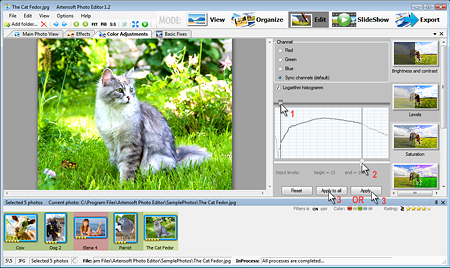
Then you customize the photo using various control elements depending on the selected tool. To apply the change to the currently selected photo, click the "Apply" button. If you need to apply this change to all photos selected in the list, you should click the "Apply to all" button. After that this change will be applied to all photos selected in the list in the background mode:
We create best photo collage and photo mosaic software! Terms Of Use       Privacy Policy       EULA
ai collage maker   © 2026 Artensoft™. All rights reserved.